
Trading is one of the UAE's most dynamic and complex business sectors. Whether you are importing goods from suppliers in Europe and Asia, exporting to customers across the GCC, or managing distribution across multiple UAE warehouses — the operational demands are significant. Multiple currencies on every transaction, landed costs that must be allocated accurately, VAT treatment that differs between imports and local purchases, and inventory spread across locations that need to move in sync with customer demand. Most UAE trading companies manage this complexity through disconnected tools and manual reconciliation. This guide shows what happens when all of it moves into one system.
The Operational Challenges Facing UAE Trading Companies
UAE trading businesses face a specific combination of pressures that most accounting software was never designed to handle:
Multi-currency on every transaction — buying in USD or EUR from international suppliers, selling in AED or SAR to local and GCC customers. Every transaction involves a currency conversion that must be recorded accurately with exchange gains and losses tracked correctly.
Landed costs invisible at the point of pricing — freight, insurance, customs duty, and clearance fees all add to the true cost of imported goods. Without systematic landed cost tracking, every pricing and margin decision is based on incomplete information.
VAT complexity on imports — import VAT paid at customs clearance is treated differently from input VAT on local purchases. If your system does not handle this distinction correctly, your VAT return is likely incorrect every filing period. Our UAE VAT setup guide for Odoo covers this in detail.
No real-time profitability by trade line — when purchasing, inventory, and sales data live in separate systems, calculating true margin by product or supplier requires manual consolidation that is always historical and always incomplete.
How Odoo Handles Multi-Currency for UAE Traders
Odoo is configured with AED as the base currency for all financial reporting — meaning every transaction, regardless of the currency it is conducted in, is automatically converted to AED for accounting purposes. Every supplier and customer carries their own transaction currency — USD, EUR, GBP, SAR — so purchase orders and invoices are raised in the currency the counterparty expects while all reporting stays in AED.
Odoo connects to live exchange rate feeds and updates rates automatically — eliminating manual rate lookup and entry for every transaction. When a purchase order is raised in USD and the supplier invoice arrives two weeks later at a slightly different rate, Odoo automatically calculates and posts the exchange difference as a gain or loss — correctly, without manual journal entries.
For trading companies with significant open foreign currency positions, Odoo provides real-time visibility into currency exposure — exactly how much is owed in each currency, how much is receivable, and what the net AED position is at any point in time.
Purchase & Sales Order Management for Import/Export
Import Purchasing
When a purchase order is raised in Odoo, the system captures the supplier, product, quantity, agreed price in supplier currency, delivery date, and applicable Incoterms — FOB, CIF, or DDP. When goods arrive, the receipt is recorded against the purchase order — automatically updating inventory and flagging discrepancies between ordered and received quantities. The supplier invoice is then matched against the purchase order and goods receipt in a three-way match that prevents overpayment and catches discrepancies before they become disputes.
Export and Local Sales
Sales orders are raised in the customer's currency with automatic AED conversion. Customer-specific price lists are applied automatically at quotation. When a sales order is confirmed for an out-of-stock product, Odoo can automatically trigger a purchase order to the preferred supplier — closing the gap between customer demand and procurement without manual intervention.
For a detailed look at how a structured Odoo implementation sets up these workflows correctly from day one our implementation guide covers the full process.
Supplier Management & Landed Cost Tracking
Supplier Management
Every supplier in Odoo carries their transaction currency, payment terms, product price lists, lead times, and performance history. When a purchase order is raised, correct currency, pricing, and terms are applied automatically — eliminating the procurement errors that create cash flow and inventory problems downstream.
Landed Cost Tracking
Odoo's landed cost module allocates all import costs to each shipment automatically:
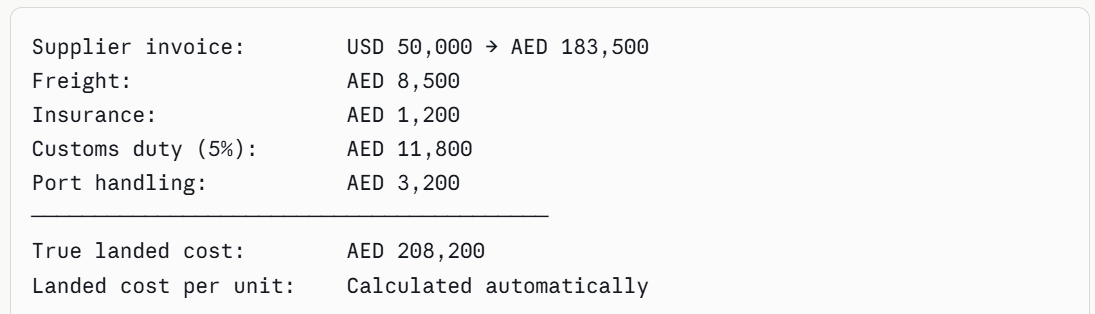
Landed cost per unit: Calculated automatically
These costs are allocated across all products in the shipment and the inventory value of each product is updated to reflect its true landed cost. Every margin calculation and pricing decision from that point forward is based on what the product actually cost to land in your warehouse — not just the supplier invoice price.
For context on overall Odoo investment, our Odoo pricing guide for UAE businesses covers the full cost breakdown.
Inventory Management Across UAE Warehouses
Odoo manages unlimited warehouse locations within a single system — a Dubai mainland warehouse, a JAFZA free zone facility, and a Sharjah distribution point all operate independently while contributing to a single consolidated inventory view.
Real-time stock visibility across all locations means when a product is out of stock in Dubai but available in Sharjah, the sales team sees this immediately and arranges an inter-warehouse transfer rather than raising an unnecessary purchase order.
Inter-warehouse transfers follow a structured workflow — request, approval, dispatch, and receipt — with full traceability at every stage. No undocumented stock movements. No inventory that disappears between locations.
Lot and serial number tracking gives UAE trading companies handling regulated goods — electronics, medical devices, or food products — complete forward and backward traceability from supplier shipment through every warehouse location to the specific customer delivery. Essential for product recalls and customer disputes.
Automated reorder rules set minimum stock levels per product per location. When stock falls below the threshold, Odoo automatically generates a purchase order to the preferred supplier — eliminating manual stock monitoring across hundreds or thousands of SKUs.
Financial Reporting & Profitability by Trade Line
Because Odoo connects purchasing, landed costs, inventory, and sales in one system, gross margin by product is calculated automatically from real data. Your management team can identify which SKUs are actually profitable after landed costs, which suppliers deliver the best margin-adjusted pricing, and which customers are buying your most profitable products — in seconds from an Odoo dashboard.
For UAE trading companies with significant foreign currency exposure, Odoo shows open positions in every currency alongside their AED equivalent in real time — giving your finance team the visibility to make informed treasury decisions.
As covered in our UAE Corporate Tax and Odoo guide, trading companies also need to ensure their financial reporting structure supports correct CT categorization — particularly for related party transactions and the separation of taxable and exempt income. Odoo's reporting handles this when correctly configured from the start.
Final Thoughts
UAE trading companies that move to Odoo stop managing operational complexity manually and start managing it automatically. Multi-currency purchasing and sales, landed cost allocation, real-time inventory across all warehouse locations, and true profitability reporting by product and supplier — all in one connected system without spreadsheets, manual reconciliation, or end-of-month data consolidation.
If you want to see exactly what Odoo looks like configured for a UAE trading operation — your currencies, your suppliers, your warehouse locations, and your product lines — book a free demo with our certified team today.